AI video generator: from an idea to a finished video
Describe what you want to see. Visuall writes the scenes, renders them with the video model you choose — Veo 3.1, Seedance 2.0, Kling 3.0, Gemini Omni Flash and more — then stitches and captions them into one video. You approve every step, so you only pay for what you keep.
Made with the Visuall AI video generator
First-person skier carving fresh alpine powder
10-second, 4-scene landscape video
Pet goldfish grows into a city-sized giant
15-second, 4-scene landscape video
Golden pharaoh mask in a torchlit tomb
15-second, 4-scene landscape video
Cartoon Paris morning turns into live action
25-second, 10-scene vertical video
Starship diving into a swirling wormhole
15-second, 3-scene landscape video
Dinosaurs roaming a modern city street
10-second, 5-scene landscape video
More in the gallery.
How it works
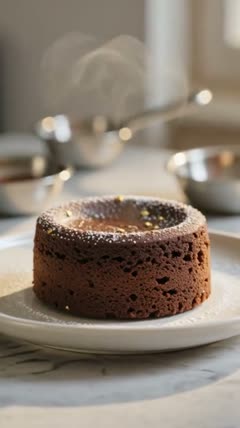
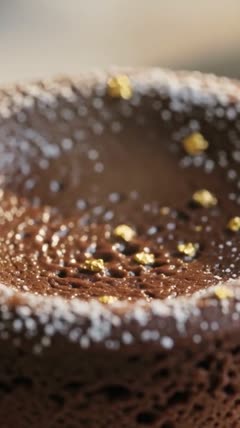
A dessert short: a gold-flaked lava cake, then warm chocolate poured into its centre.
- A lava cake with gold flakes on a white plate3s
- Macro: sugar dust and gold on the crust3s
- A spoon pours glossy chocolate into the centre4s
 ▶
▶ ▶
▶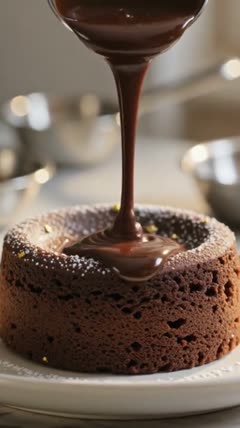 ▶
▶A dessert short: a gold-flaked lava cake, then warm chocolate poured into its centre.
- A lava cake with gold flakes on a white plate3s
- Macro: sugar dust and gold on the crust3s
- A spoon pours glossy chocolate into the centre4s
▶▶▶The AI Director template: your idea becomes timed scenes, rendered as one take and finished as a video. An illustration: the boxes are the template’s own, the pictures are frames from one of our example videos.
- 1
Describe your idea
A sentence or a full story. Pick landscape for YouTube or vertical for Shorts, Reels and TikTok.
- 2
AI plans the scenes
The scene planner turns your idea into timed shots, each with its own prompt you can edit.
- 3
Pick the model
Veo 3.1 for natural motion, Seedance 2.0 for physics and sound, Gemini Omni Flash for people who talk, Kling 3.0 for multi-shot takes.
- 4
Approve, stitch, caption
Keep the clips you like, re-run the ones you don’t, and get one finished video with captions.
AI video models and prices
All on the same credits. Credit packs start at $5 for 100 credits, and new accounts get 35 free. Compare every model →
| Model | Price |
|---|---|
| Veo 3.1 LiteGoogle720p · 4, 6 or 8 s · silent | 8 credits / 4s clip |
| Kling 2.6 ProKuaishouImage to video · 5 or 10 s · silent | 20 credits / 5s clip |
| MiniMax H3 MaxMiniMax768p · 5–15 s | 27 credits / 5s clip |
| Veo 3.1 FastGoogle720p · 4, 6 or 8 s · silent | 22 credits / 4s clip |
| Kling 3.0Kuaishou3–15 s · multi-shot · silent | 27 credits / 5s clip |
| Gemini Omni FlashGoogle720p · 3–10 s · speech & sound | 33 credits / 5s clip |
| Seedance 2.0ByteDance720p · 4–15 s · sound | 52 credits / 5s clip |
| Veo 3.1Google720p · 4, 6 or 8 s · silent | 52 credits / 4s clip |
More than a one-click video generator
Most AI video generators give you one clip from one prompt. Visuall is built on a canvas: each step — the story, the scenes, the keyframes, the video model, the stitching and the captions — is a box you can see, change and re-run. Change one scene and only that scene is generated again; everything that didn’t change is reused for free.
That is how a 4-second clip becomes a 30-second video with the same character in every shot: make the character once as an image, then animate them in every scene.
Text to video, image to video, or a whole story
- Text to video: one prompt, one clip, with any of the video models below.
- Image to video: upload a photo or a keyframe and animate it, so the look is exactly yours.
- Story to video: the AI Director template writes timed scenes from your story and renders a finished, captioned video.
- Storyboard to video: generate keyframes, approve the ones you like, then animate only those.
Every top AI video model in one place
You don’t need a separate subscription for each model. Google Veo 3.1 (with Fast and Lite), ByteDance Seedance 2.0, Google Gemini Omni Flash, Kling 3.0 and MiniMax H3 Max all run on the same credits, and you can mix them in one video: a cheap Veo 3.1 Lite draft, then the final shots on Veo 3.1 or Seedance 2.0.
What people make with it
- YouTube Shorts, Instagram Reels and TikTok videos in 9:16
- Product ads from a single product photo
- AI influencer reels with the same face in every post
- Short films, music video scenes and story videos
- History and travel vlogs with a character who talks to the camera
Frequently asked questions
Is the Visuall AI video generator free?
You can start free: every new account gets 35 credits with no credit card, enough for a short video — for example a 5-second AI Director video or a 4-second Veo 3.1 Fast clip. After that, credits come in packs from $5 or monthly plans from $9.
Which AI video model is best?
It depends on the shot. Veo 3.1 gives natural, real-speed motion; Seedance 2.0 is best for physics and generates sound; Gemini Omni Flash makes people speak your lines; Kling 3.0 renders several scenes in one continuous take. On Visuall you can try them side by side on the same prompt.
How long can my video be?
Single clips run from 3 to 15 seconds depending on the model. For longer videos, the canvas plans several scenes and stitches the clips into one video, with captions.
Can I make vertical videos for TikTok, Reels and Shorts?
Yes. Choose 9:16 on the video box (or start from the AI Shorts generator) and every scene is rendered vertical.
Do the videos have sound?
Seedance 2.0 and Gemini Omni Flash generate sound with the video, and the sound is kept when clips are stitched. Veo 3.1 and Kling 3.0 clips are silent.
Can I use the videos commercially?
Yes, you can use what you make in your own and your clients’ projects, as set out in our Terms.
Do I pay for failed generations?
No. A failed result is never charged, and steps that didn’t change are reused for free when you run the canvas again.
Try it free
35 free credits when you sign up. No credit card required.