We made a 4K watch film from three iPhone 12 photos
We photographed a LIP Besançon watch three times on a table with an iPhone 12 and built a 4K product film from those three photos. We made every shot with three models (Kling 3.0 Pro, Veo 3.1, Seedance 2.0) and compared the nine clips frame by frame.
Watch the 4K film, or open the canvas in your own account.
The start: three photos, three keyframes
The photos were taken on a white table in flat light, at 4032×3024. The camera is an iPhone 12: an ordinary phone from 2020 with a 12 MP wide (f/1.6) and an ultra-wide lens; 4032×3024 is that 12 MP sensor's full resolution. We wanted to see what a phone from a pocket can do without any studio gear.
From each photo, Nano Banana 2 Edit made a 4K (5504×3072) advertising still; the other two photos went in as references, so the model saw the watch from three sides. Every keyframe went through an approval step before it went to video.
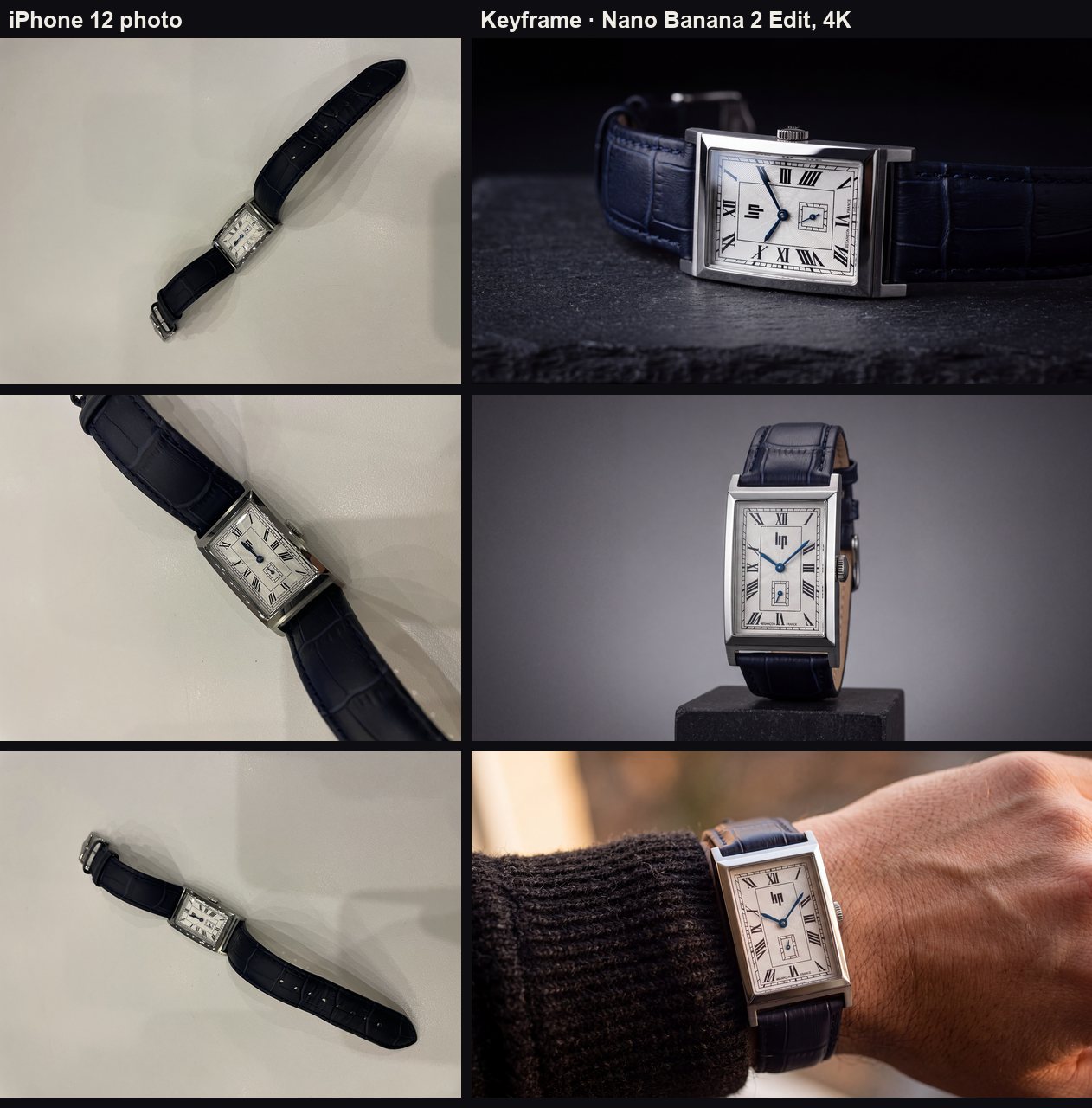
The model turned the photos' time (around 12:00, the hands on top of each other) into 10:10 in all three stills; that is the standard pose in watch advertising and it keeps the logo clear, so we left it. The third still was made twice more: in the first, the case had shifted to a gold tone and the BESANÇON FRANCE line at the bottom was garbled. A tighter framing, with the second still's clean dial as a reference, fixed it. The stills cost 36 + 24 credits.
Nine clips, frame by frame
In every shot the three models started from the same approved still and the same motion prompt, without sound, at 1080p. The grids show each clip at the same moments (start, 25%, 50%, 75%, last frame). The crops are 600×600 pixels from the middle of the last frame, unscaled.
Shot 1 · dial macro (Seedance chosen)
Keyframe prompt (Nano Banana 2 Edit): Keep the watch exactly as in the photo: the same case, dial, indices, numerals and printed text, the hands at exactly the same time, the crystal and the strap. Do not add, remove or redraw any text or logo. Studio macro of the dial: the watch lies on a dark slate surface, camera low and close at a slight angle, a single soft key light from the left drawing a long highlight across the crystal and the polished bezel; deep black background; the dial text crisp and readable. Photorealistic luxury watch advertising still, 100mm macro lens, f/5.6.
Motion prompt (all three models): Very slow push-in toward the dial; a soft highlight glides across the crystal; the hands, indices and printed text stay exactly as they are, sharp and unchanged; no deformation of the case or the text.
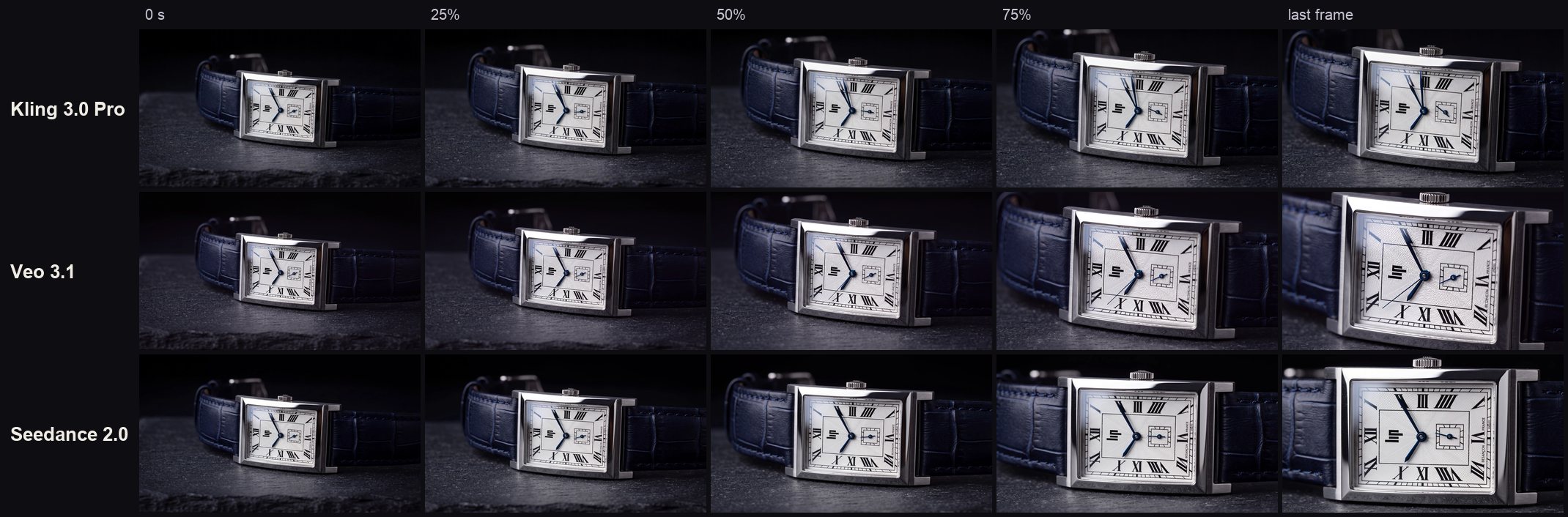
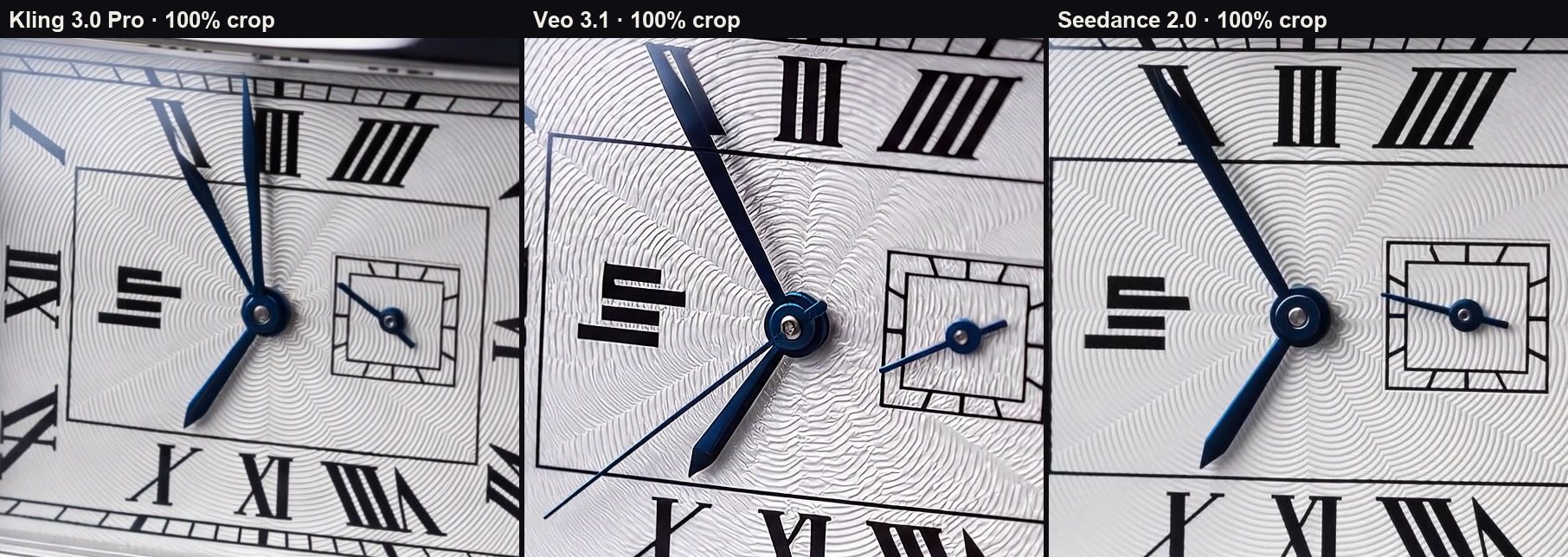
- Kling: the smallest push-in; the guilloché pattern is soft. It added a third hand the watch doesn't have.
- Veo: the strongest push-in. But like Kling it added a third hand the watch doesn't have, a thin central seconds hand; on this watch the seconds are only in the small sub-dial. A mistake that changes the product, so the clip was out.
- Seedance: two hands, the small sub-dial, the text right; clean motion. The guilloché pattern shows best in this model. ✅
Shot 2 · orbit on the plinth (Seedance chosen)
Keyframe prompt (Nano Banana 2 Edit): Keep the watch exactly as in the photo: the same case, dial, indices, numerals and printed text, the hands at exactly the same time, the crystal and the strap. Do not add, remove or redraw any text or logo. The watch stands upright on a small black stone plinth, three-quarter view of the case side, crown and strap; graded grey seamless backdrop; two strip lights reflecting cleanly along the case flanks. Photorealistic advertising still, 85mm lens, f/8.
Motion prompt (all three models): Slow, smooth 60-degree orbit around the watch at a constant distance; the strip-light reflections slide along the polished case; the strap and the crown stay intact; the dial text stays legible.
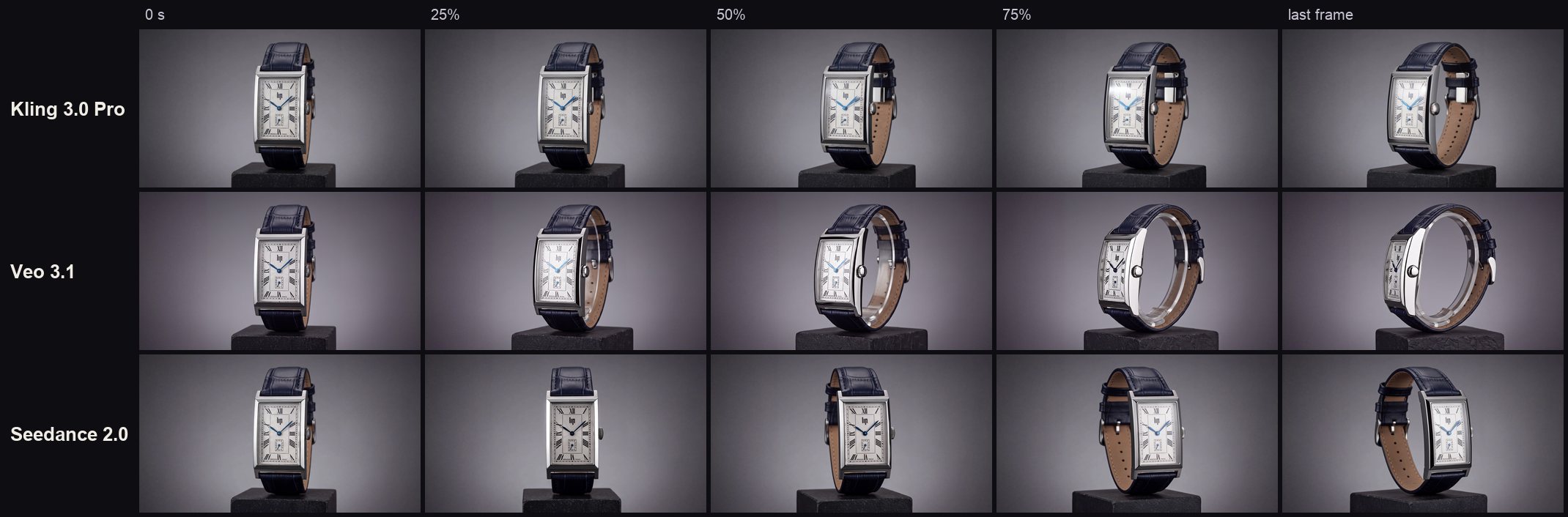
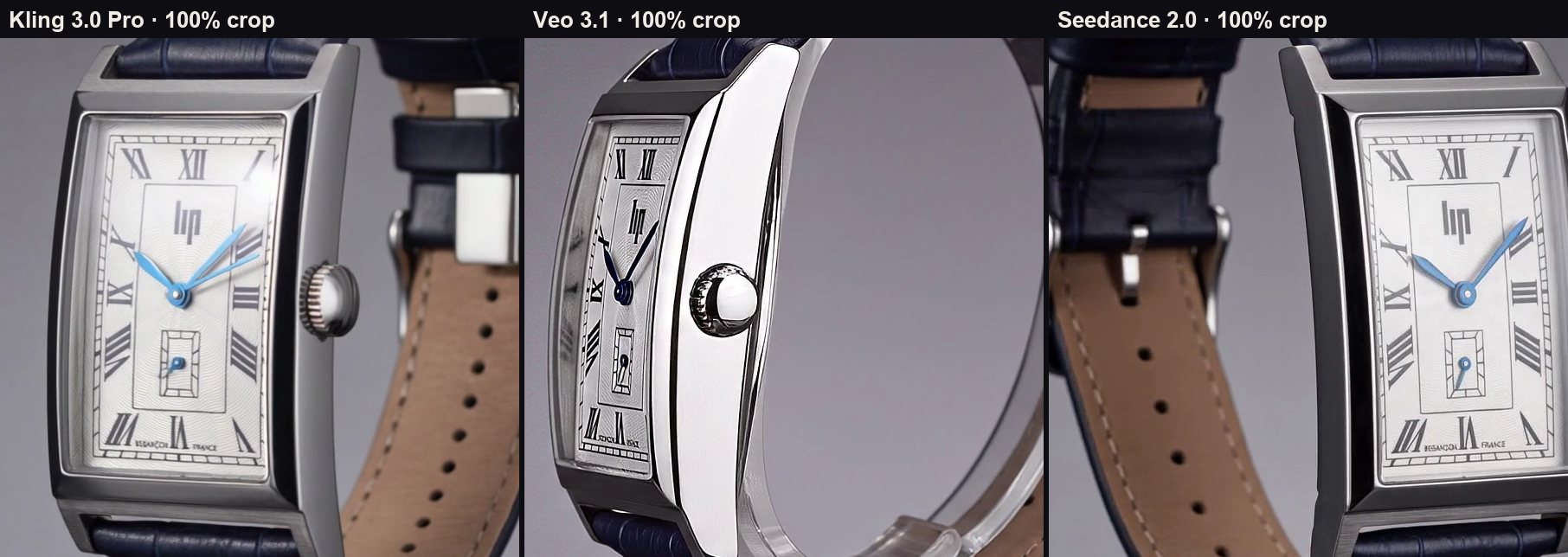
- Kling: only a slight turn, far short of the 60 degrees the prompt asked for. The hands drifted to light blue.
- Veo: turns all the way to the profile, with the sharpest crown and case. But it mounted the strap on a clear stand, and in the last frame the dial is side-on and unreadable.
- Seedance: a three-quarter turn that shows the strap's leather lining; the dial reads from start to end. ✅
Shot 3 · on the wrist (Veo chosen)
Keyframe prompt (Nano Banana 2 Edit, third attempt): Keep the watch exactly as in the photo: the same brushed and polished stainless-steel case, silver in colour (never gold, bronze or rose), the same guilloché dial, Roman numerals, the LIP logo and the small square seconds sub-dial above VI. There is NO central seconds hand: only the hour and minute hands at the centre; the seconds are shown only in the small sub-dial. The only text at the bottom of the dial reads exactly "BESANÇON FRANCE", letter for letter; do not add, remove or redraw any other text or logo, and there is no text anywhere below that line. The hands show 10:10. The dial must match the reference studio image of the same watch exactly (its LIP logo, numerals and the "BESANÇON FRANCE" line). The watch on a wrist, framed tight and close so the watch is large in frame, the dial filling about half of the frame height: a dark wool sleeve cuff, the hand relaxed, no face anywhere in frame; warm evening window light that keeps the steel neutral silver; the dial turned toward the camera and readable. Photorealistic lifestyle advertising still, 50mm lens, f/2.8.
Motion prompt (all three models, second round): The wrist stays still, already facing the camera; the camera slowly and smoothly pushes in on the dial; a soft warm highlight drifts across the crystal. Only the hour and minute hands at the centre, no central seconds hand; the small seconds sub-dial stays as it is; the text "BESANÇON FRANCE" and the LIP logo stay exactly as they are; the steel case stays silver. No face in frame; calm, elegant motion.
First-round motion prompt (the wrist turned away): The wrist turns slowly toward the camera so the dial faces the lens, then the camera gently pushes in on the dial; the hands stay at the same time; no face in frame; calm, elegant motion.
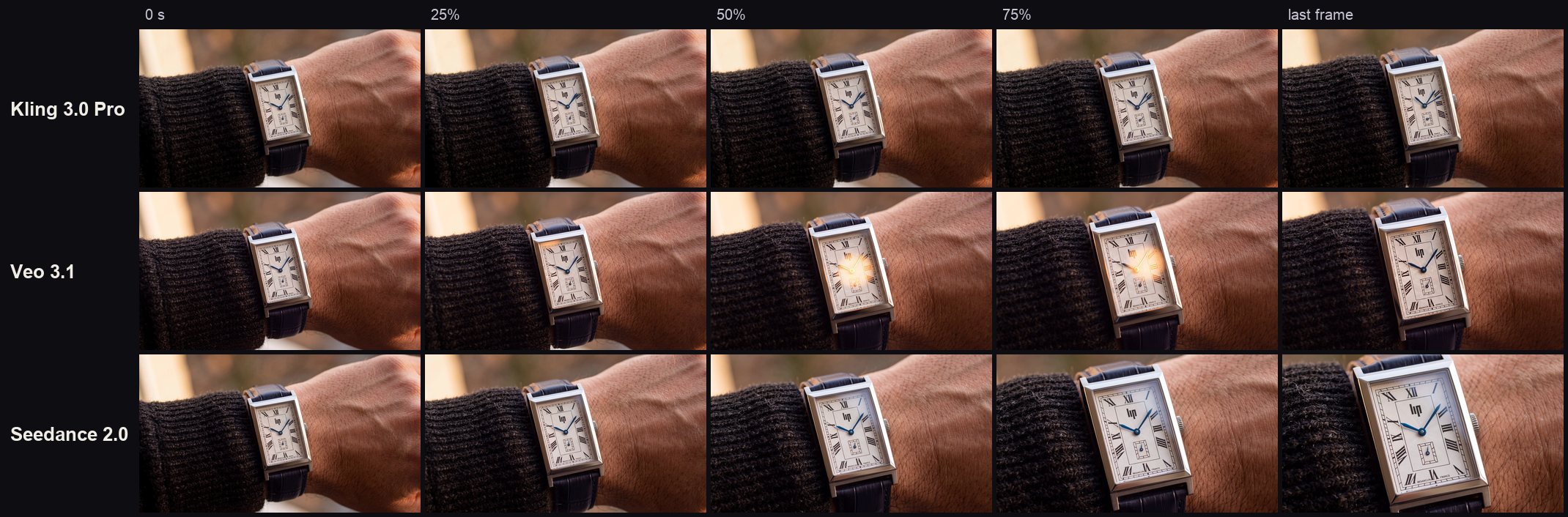
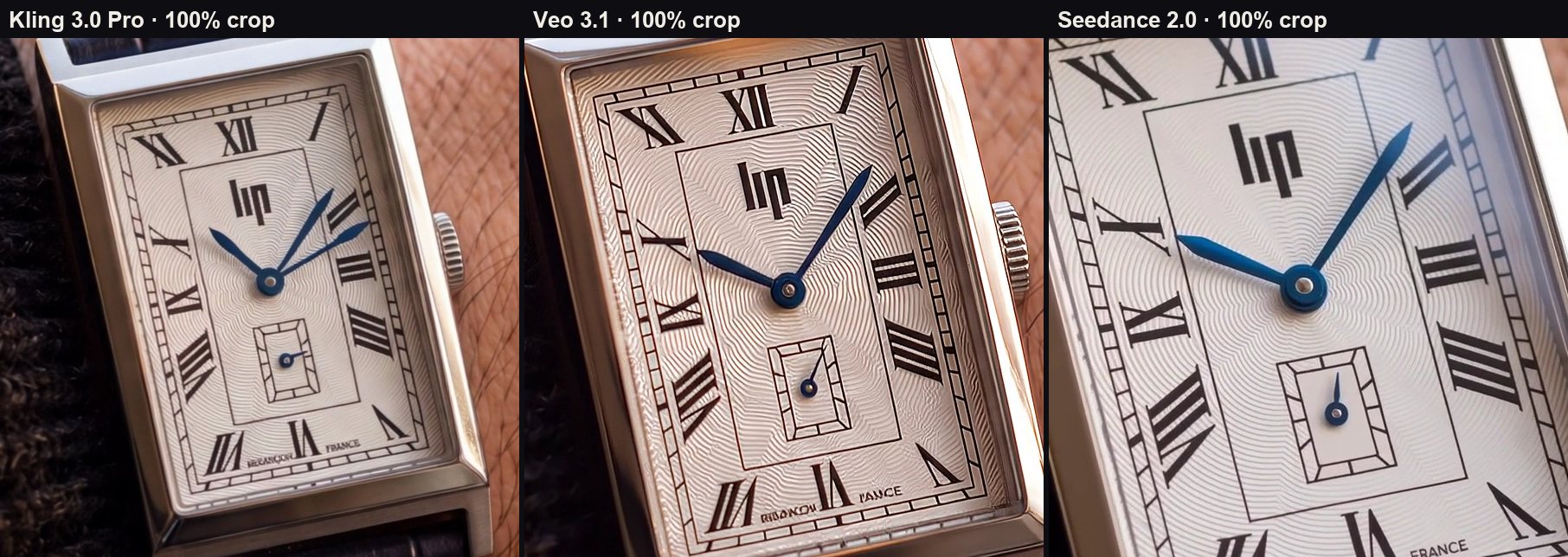
- Kling: split the minute hand in two, so two blue hands point toward II; again the softest picture.
- Veo: the sharpest dial; in the middle, warm flares pass over the dial. The text at the bottom is garbled in the last frame. ✅
- Seedance: a smooth, steady push-in with the right hands; one letter of the text slipped.
This is the second round, after keyframe 3 was fixed. The first round's mistakes are below.
Sharpness: Kling is softer and less crisp
Kling usually gives the smoothest motion, but its picture often feels lower in resolution and less crisp. The measurement agrees: in all three shots Kling has the least fine detail.
| Model | Shot 1 | Shot 2 | Shot 3 | Output | Bitrate |
|---|---|---|---|---|---|
| Veo 3.1 | 1.00 | 1.00 | 1.00 | 1920×1080, 6 s | 10–12 Mbps |
| Seedance 2.0 | 0.52 | 0.35 | 0.51 | 1920×1080, 5 s | 6–8 Mbps |
| Kling 3.0 Pro | 0.31 | 0.16 | 0.29 | 1928×1072, 5 s | 8–18 Mbps |
The values are the Laplacian variance (a measure of fine detail) of two frames per second of each clip; in each shot the sharpest clip is 1.00. Kling's pixel count is the same as the others' and its bitrate is among the highest, so the softness doesn't come from compression but from how the model draws: the guilloché pattern and the crown's knurling look melted. Veo's high value owes something to sharpening and grain too. That is why, in a product film headed for 4K, Kling is better kept for short moments in motion, such as a bridge.
The canvas: where the film was built
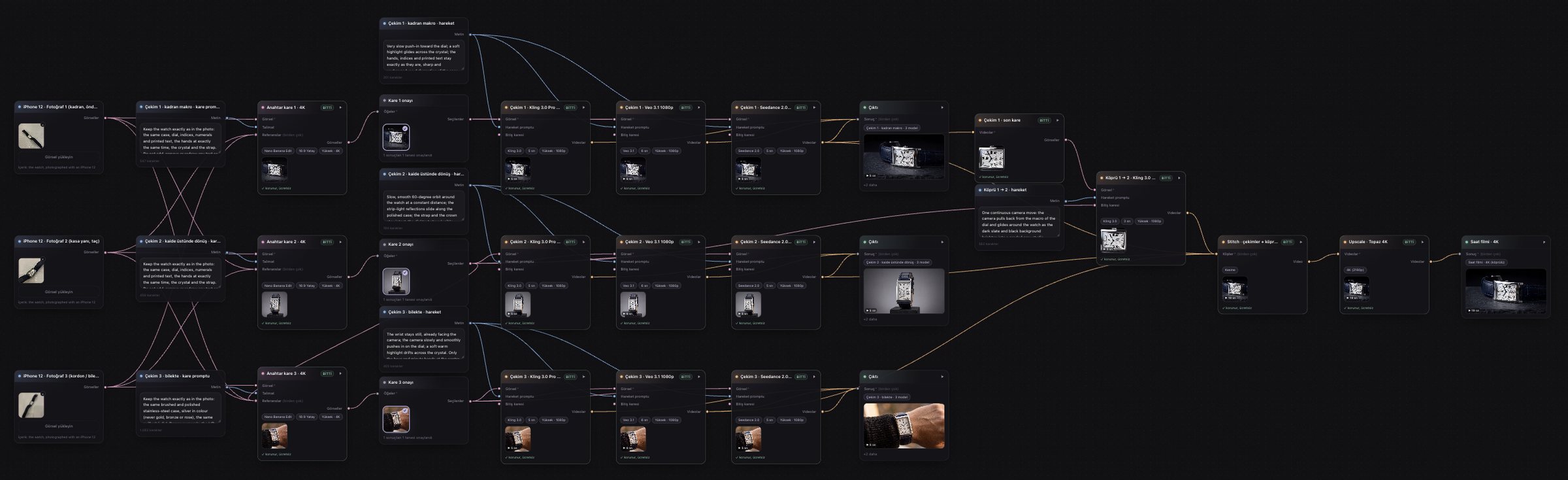
The whole film was built on one Visuall canvas: the photos, stills, prompts, nine clips and the 4K output on one surface, wired together.
Open the canvas in your own account: visuall.ai/workflows/new?canvas=qZODjUAd. Once you sign up, a copy of this canvas lands in your account: the three iPhone photos, the prompts, the nine clips and the 4K film ready in their boxes. Opening it costs no credits; replace the photos with your own product and only the boxes after them are made again.
Why not go straight to each model's site?
We could have used each of the three models on its own site. Why we chose the Visuall canvas for this film, most important first:
- A revision pays only for the box that broke. In keyframe 3 the case turned gold and the text broke. Working directly, that means making a new still, uploading it to three sites again and asking for the clips from scratch. On the canvas only the still's box ran again, twice (24 credits), then Shot 3, which hangs off it (240 credits); Shots 1 and 2 were not touched, and the refused Seedance attempt cost nothing.
- The prompts live in boxes, and fixes happen at the source. Working directly, the same prompt is typed into three separate panels and which clip came from which version gets lost. On the canvas every keyframe and motion prompt is a text box; the quotes above come from there. When the wrist turned the wrong way, only the motion prompt changed and the approved still stayed.
- All three models animate the same pixels. Working directly, each site takes the still with its own cropping and compression. On the canvas the same 4K still went to all three models, so the frame-by-frame comparison is fair, and the winner changed with the shot: Seedance in Shots 1 and 2, Veo in Shot 3.
- The film is finished in one place. Working directly, the clips are downloaded, joined in a separate edit and upscaled in a separate tool. On the canvas Stitch and Upscale sit on the same surface; from the photos to the 4K film took about an hour.
Direct access has its place: if you are making one clip with one model, the provider's own site is enough, the raw clip may be cheaper there, and some model-specific controls haven't reached the canvas yet. But this film needed three shots, three models and two rounds of revisions, and that is exactly where the canvas made the difference.
Cost and time
The final film cost 489 credits; on the Pro plan (1,300 credits, $39) that is about $15. From the photos to the 4K film, reviews and fixes included, took about an hour.
| Box | Model and quality | Credits | Dollars (Visuall.ai Pro) |
|---|---|---|---|
| 3 keyframes | Nano Banana 2 Edit, High (4K) | 36 | 1.08 |
| Shot 1 | Seedance 2.0, 1080p, 5 s | 127 | 3.81 |
| Shot 2 | Seedance 2.0, 1080p, 5 s | 127 | 3.81 |
| Shot 3 | Veo 3.1, 1080p, 6 s | 77 | 2.31 |
| Bridge 1 → 2 | Kling 3.0 Pro, 1080p, 3 s | 22 | 0.66 |
| Stitch | 1080p master, 19 s | 0 | 0 |
| Upscale | Topaz, 4K | 100 | 3.00 |
| Final film | 489 | 14.67 |
With the clips made for the comparison, the remakes and two cancelled 4K versions, the whole test came to 1,379 credits.
Mistakes and fixes
In a watch film most mistakes happen on the dial: where a model doesn't know the watch, it fills in a watch it knows. The workflow let us fix each one at its source, by running only the box concerned again.
| Mistake | Where | Why | Fix |
|---|---|---|---|
| A central seconds hand, a doubled minute hand | Shot 3, first round: Kling and Veo | Keyframe 3's dial was small and its text garbled | Keyframe 3 made again (two attempts, 24 credits): silver steel, "no central seconds hand", BESANÇON FRANCE letter for letter |
| SWISS MADE on the dial | Shot 3, first round: Seedance | The same garbled text; the model filled it with a phrase it knows | The same keyframe fix |
| The wrist turns away in the first 2 seconds | Shot 3, first round: Seedance | The "wrist turns toward the camera" motion | The wrist stays still and only the camera moves in; Shot 3 made again (240 credits) |
| Clip refused: "the output audio may be related to copyright" | Shot 2: Seedance | Seedance was asked for sound even with sound off | The clip was tried again and passed; the refused attempt cost nothing. The cause is being fixed too |
| A cut-off arm in the bridge | Bridge 2 → 3 | The model couldn't get from the studio to the wrist in one move | Bridge dropped, a straight cut from Shot 2 to 3 |
The final film
The film is 19 seconds, 3840×2160, 24 fps. The chosen clips were joined in Stitch and upscaled to 4K with Topaz: watch the 4K film.
| # | Part | Model | Length |
|---|---|---|---|
| 1 | Shot 1 · dial macro | Seedance 2.0 | 5 s |
| 2 | Bridge 1 → 2: pulling back from the macro into the studio | Kling 3.0 Pro | 3 s |
| 3 | Shot 2 · orbit on the plinth | Seedance 2.0 | 5 s |
| 4 | Shot 3 · on the wrist (straight cut) | Veo 3.1 | 6 s |
The bridge starts on Shot 1's last frame and ends on Shot 2's approved still; in a 3-second move Kling's softness doesn't show. One flaw remains: in Shot 1 the text at the dial's edge reads "BESANÇON PRANCE".
Result pages
| Page | What's on it |
|---|---|
| 4K film | Final, 3840×2160 |
| 1080p master | Stitch output, before 4K |
| Bridge 1 → 2 | Kling 3.0 Pro, 3 s |
| Photos and keyframes | The three iPhone 12 photos and the first three keyframes |
| Keyframe 3, final | The approved third attempt |
| Shots 1 and 2, Shot 3 first round | Eight clips, each with its model |
| Shot 2 · Seedance | The retried clip that made the film |
| Shot 3, second round | Kling, Veo, Seedance |
| Canvas | In your own account, with every result |