Building a bag film step by step: VELLARA Arc
We shot a 22-second 4K product film for a made-up brand: three shots, three video models, two bridge clips between them, one canvas.
The final film cost 454 credits, about $14 on the Pro plan, and took about 12 minutes.
Below we open the canvas step by step. Then, from a producer's seat, we explain why we work through a workflow instead of going to the same models directly. If you only read one section, read From a producer's seat.
Why a bag
A luxury bag puts the three things video models struggle with most into a single frame:
- a logo that has to stay legible,
- a thin metal part that moves
- and a surface texture seen up close.
If a model loses any one of them, the client notices on the first viewing.
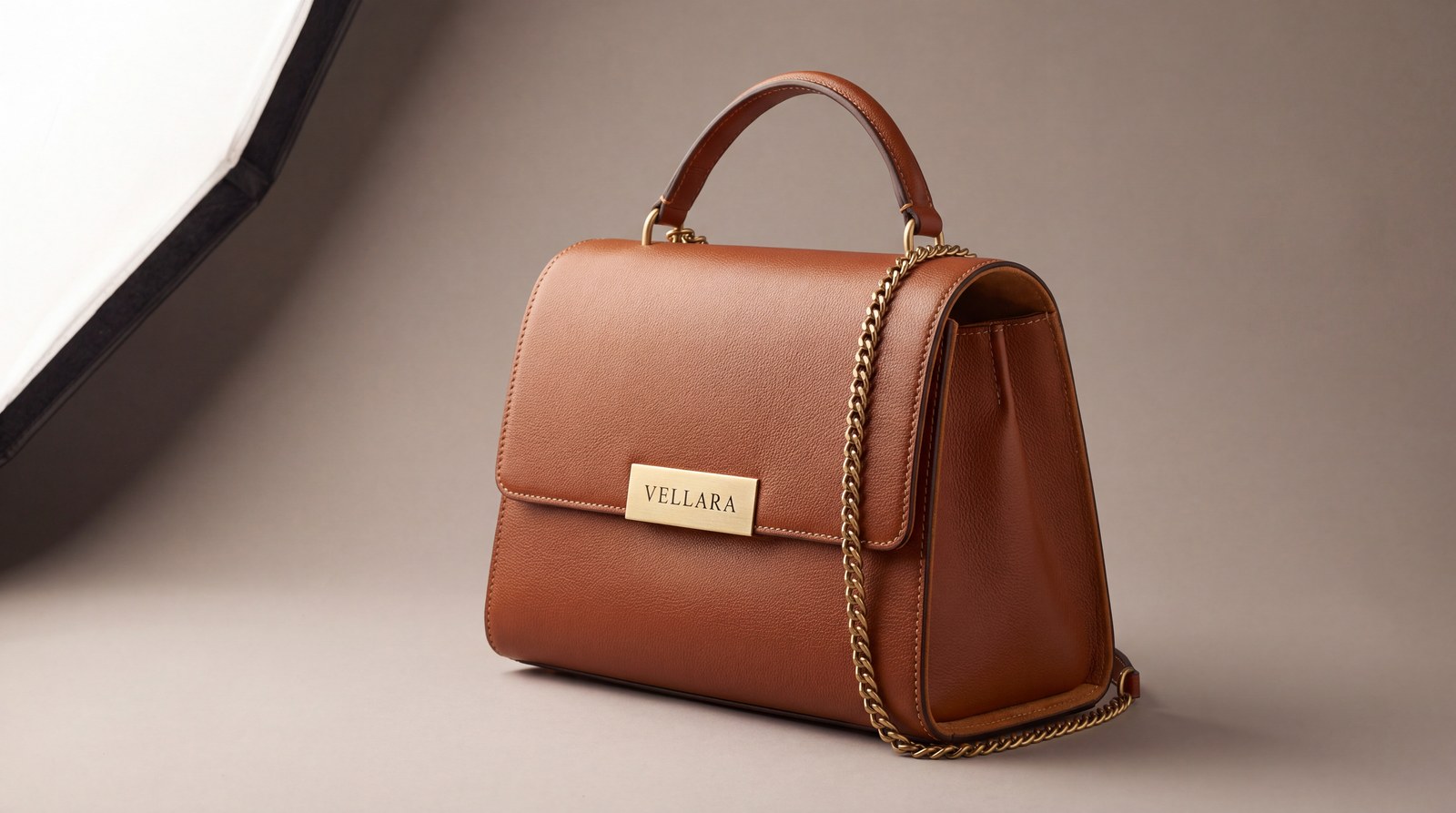
We made the product up, so that no real brand's logo is used: VELLARA Arc. A structured top-handle bag in cognac calfskin. On the front flap, a brushed-brass plate engraved "VELLARA", tone-on-tone contrast stitching and a fine brass chain strap.
The film has three shots, and each one tests something different:
- Studio, 90° orbit. The camera circles the bag. Test: do the plate's shape, lettering, highlights and reflections hold through the orbit?
- Karaköy, tracking shot. A woman in a cream trench coat walks over cobblestones at sunset; the camera follows at bag height and her face stays out of frame. Test: do the chain strap and the plate survive the walk?
- Bosphorus, the product "hero" shot. The bag sits on a stone step beside her hand; the plate turns to the camera and the camera pushes in. Test: are the lettering and the typeface right in the last frame?
We made every shot with Kling 3.0 Pro, Veo 3.1 and Seedance 2.0 from the same keyframe and picked the best one per shot. Then we joined the chosen shots with two bridge clips, each running from the frame where one shot ends to the frame where the next begins.
The whole canvas
The canvas has 33 boxes, all wired to each other from left to right: a hero image, three keyframes, nine clips, two Last Frame boxes, two bridge clips, Stitch, Upscale and the outputs. Nine text boxes go with them (the brief, three keyframe prompts, three motion prompts and two bridge prompts).
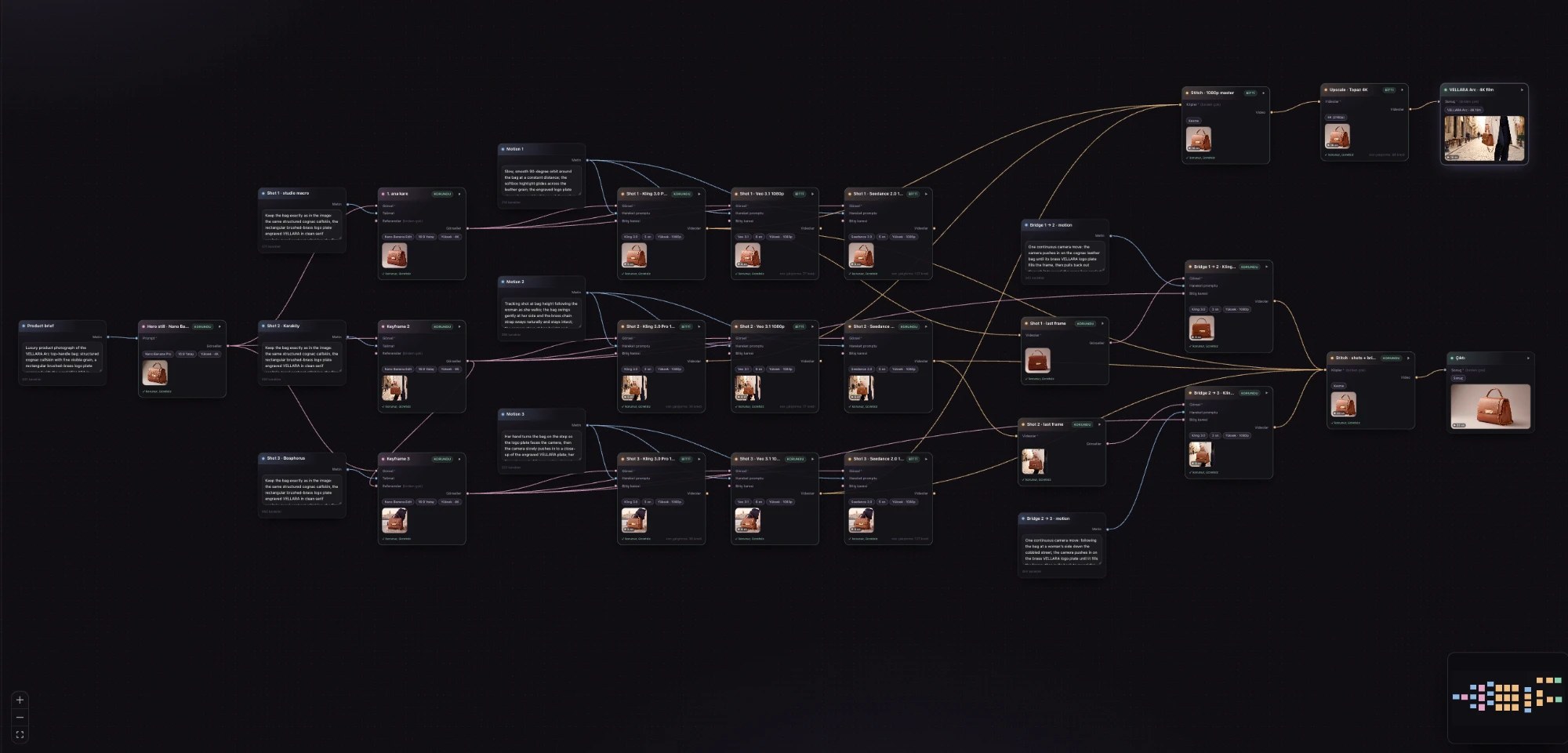
You can also have the canvas agent build the same canvas from a short description of what you want.
Step by step
The idea of the canvas is simple: lock the product once, in a 4K photo; then let every model animate the same pixels. Consistency comes from the input image, not from prompt luck.
1. Product image (hero)
A single Generate Image box: Nano Banana Pro, quality High, 16:9. High routes the model to 4K output; the file comes back at 5504×3072 pixels. The prompt is written like a product photographer's brief: material, the plate's shape and typeface, light direction, lens and aperture.
Luxury product photograph of the VELLARA Arc top-handle bag: structured cognac calfskin with fine visible grain, a rectangular brushed-brass logo plate engraved with the word VELLARA in clean serif capitals, tonal contrast stitching, a fine brass chain shoulder strap … Medium-format camera, 100mm lens, f/8, ultra sharp, editorial advertising quality. No other text or logos.
2. Keyframes
Three Edit Image boxes (Nano Banana 2 Edit, High, 4K), each taking the hero image as a reference and placing the bag in a scene. Every prompt starts with the same locking sentence:
Keep the bag exactly as in the image: the same structured cognac calfskin, the rectangular brushed-brass logo plate engraved VELLARA in clean serif capitals, tonal contrast stitching, the fine brass chain strap.
Then comes the scene: a studio close-up, the bag in the hand of a woman walking through Karaköy, the bag on a stone step by the Bosphorus. The third keyframe also takes the second one as a reference, so the same trench coat and trousers come back.
In the two frames with a person, we deliberately framed the woman from the chest down; her face is out of frame. The reason is Seedance 2.0: its maker, ByteDance, rejects input images that contain a photo-real face with a privacy filter, whether or not the image was made by AI. In our first attempt, Seedance refused these two shots for exactly that reason. Once we added the sentence below to the prompts, all nine clips were made.
Framed from the chest down at bag height: her head and face are out of frame, cropped at the shoulders, so the bag and her hand are the subject.

In advertising, you agree with the client on a storyboard and keyframes first. No shot is animated until its frames are approved.
3. Motion prompts
Image and motion live in separate boxes. The keyframe prompt says what the frame looks like; the motion prompt says what the camera and the subject do. So changing a shot's motion doesn't mean making its frame again.
- Shot 1: Slow, smooth 90-degree orbit around the bag at a constant distance … the engraved logo plate stays sharp and legible; no deformation of the bag, strap or lettering.
- Shot 2: Tracking shot at bag height following the woman as she walks; the bag swings gently at her side and the brass chain strap sways naturally and stays intact; the camera stays at bag height and never tilts up to her face.
- Shot 3: Her hand turns the bag on the step so the logo plate faces the camera, then the camera slowly pushes in to a close-up of the engraved VELLARA plate; her face stays out of frame.
4. Nine clips, in parallel
Each keyframe and motion prompt is wired to three Animate boxes: Kling 3.0 Pro (5 s), Veo 3.1 (6 s), Seedance 2.0 (5 s). All at High quality, true 1080p and silent. The nine boxes were started with one click; depending on the providers' queues, some of them started a few minutes later. Kling clips took 1 min 42 s – 1 min 51 s, Veo clips 2 min 9 s – 2 min 15 s, Seedance clips 3 min 5 s – 3 min 26 s. From the brief to all nine clips being ready took about 7 minutes.
5. Bridge clips
The chosen shots are joined not by hard cuts but by two bridge clips. Each bridge is two boxes:
- A Last Frame box outputs a shot's last frame as an image.
- An Animate Image box (Kling 3.0 Pro, High, 3 s) starts from that frame and ends on the next shot's keyframe, wired into its End frame input.
Since the next shot starts on exactly that keyframe, the joins don't show. The two bridges cost 22 credits each; the nine clips came from the cache. The bridge prompt gives the camera a single move: push in on the logo plate and come out through it into the next scene.
One continuous camera move: the camera pushes in on the cognac leather bag until its brass VELLARA logo plate fills the frame, then pulls back out through it to reveal the same bag carried at a woman's side on a cobbled Karaköy street at golden hour …

Stitch also has ready-made transitions (crossfade, fade through black, zoom). They're free and instant, but they only lay one shot over the other. A bridge makes a real camera move between two scenes.
Results: same frame, three models
Again no model carried the logo intact through all three shots; this time each shot had a different winner. Kling in shot 1, Seedance in shot 2, Veo in shot 3.
| Shot | Kling 3.0 Pro | Veo 3.1 | Seedance 2.0 | Picked |
|---|---|---|---|---|
| 1 · Studio, 90° orbit | The plate's shape and lettering held through the orbit | Turned far past 90°; the chain strap moved | The plate went from brass to dark mid-orbit, then came back | Kling |
| 2 · Karaköy tracking | The bag softened as it swung; the plate is unreadable in the motion blur | The lettering on the plate turned into unreadable letters | "VELLARA" sharp and serifed; the chain intact | Seedance |
| 3 · Bosphorus, last frame | Serif lettering held | Serif lettering held; the sharpest leather texture | Serif lettering held | Veo |
Each of the nine clips has its own result page, with the original file:
| Shot | Kling 3.0 Pro | Veo 3.1 | Seedance 2.0 |
|---|---|---|---|
| 1 · Studio | visuall.ai/p/9A8Yn6FE | visuall.ai/p/kUkh9JA4 | visuall.ai/p/mS0peqBI |
| 2 · Karaköy | visuall.ai/p/GWSIFuTR | visuall.ai/p/cRMQ2Jvy | visuall.ai/p/BPZxIZxJ |
| 3 · Bosphorus | visuall.ai/p/GqJEF0vU | visuall.ai/p/Y5_qoyJi | visuall.ai/p/UNrtRV3H |
In each image below, left to right: Kling, Veo and Seedance; the top row is the middle of the clip, the bottom row its last frame.
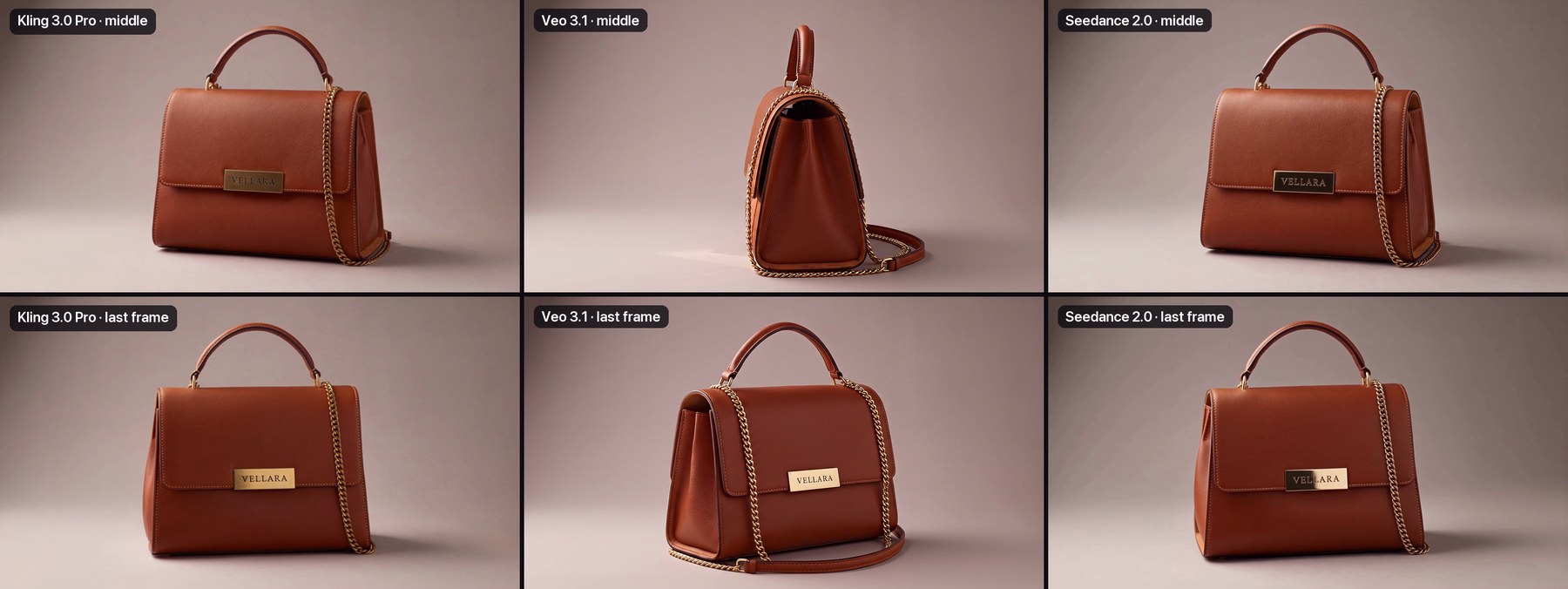
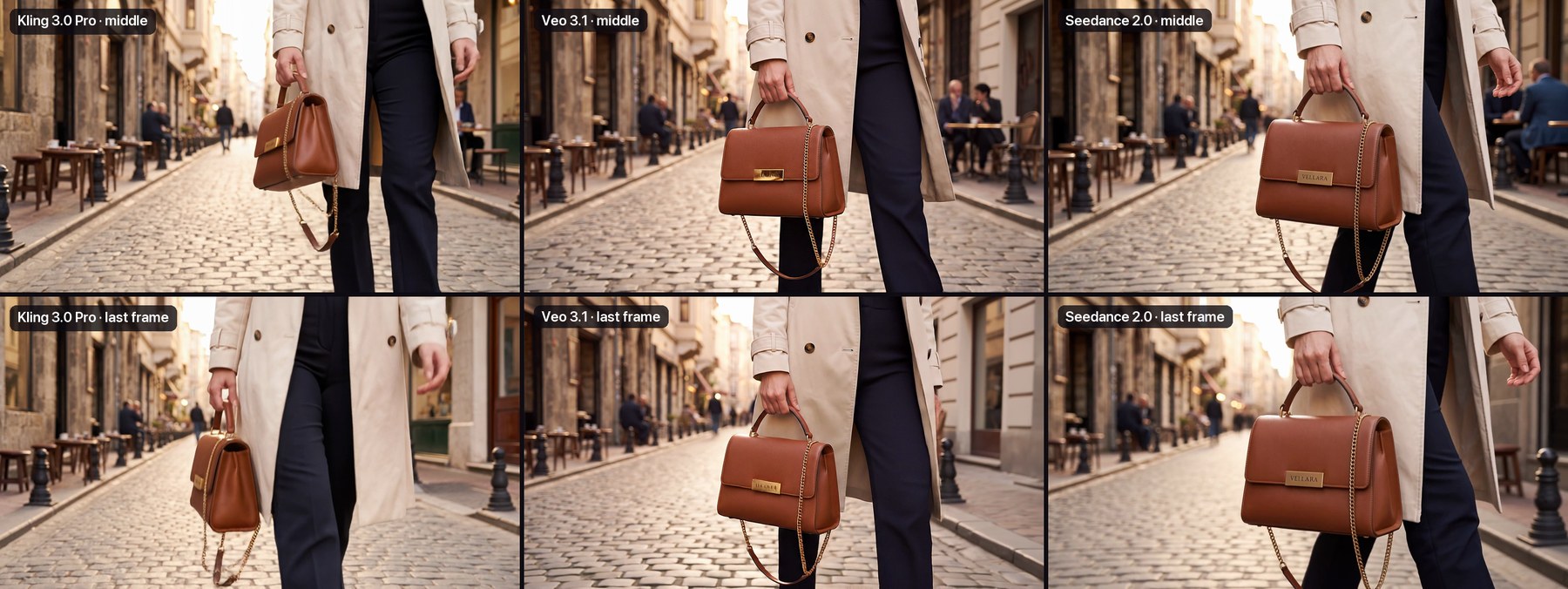
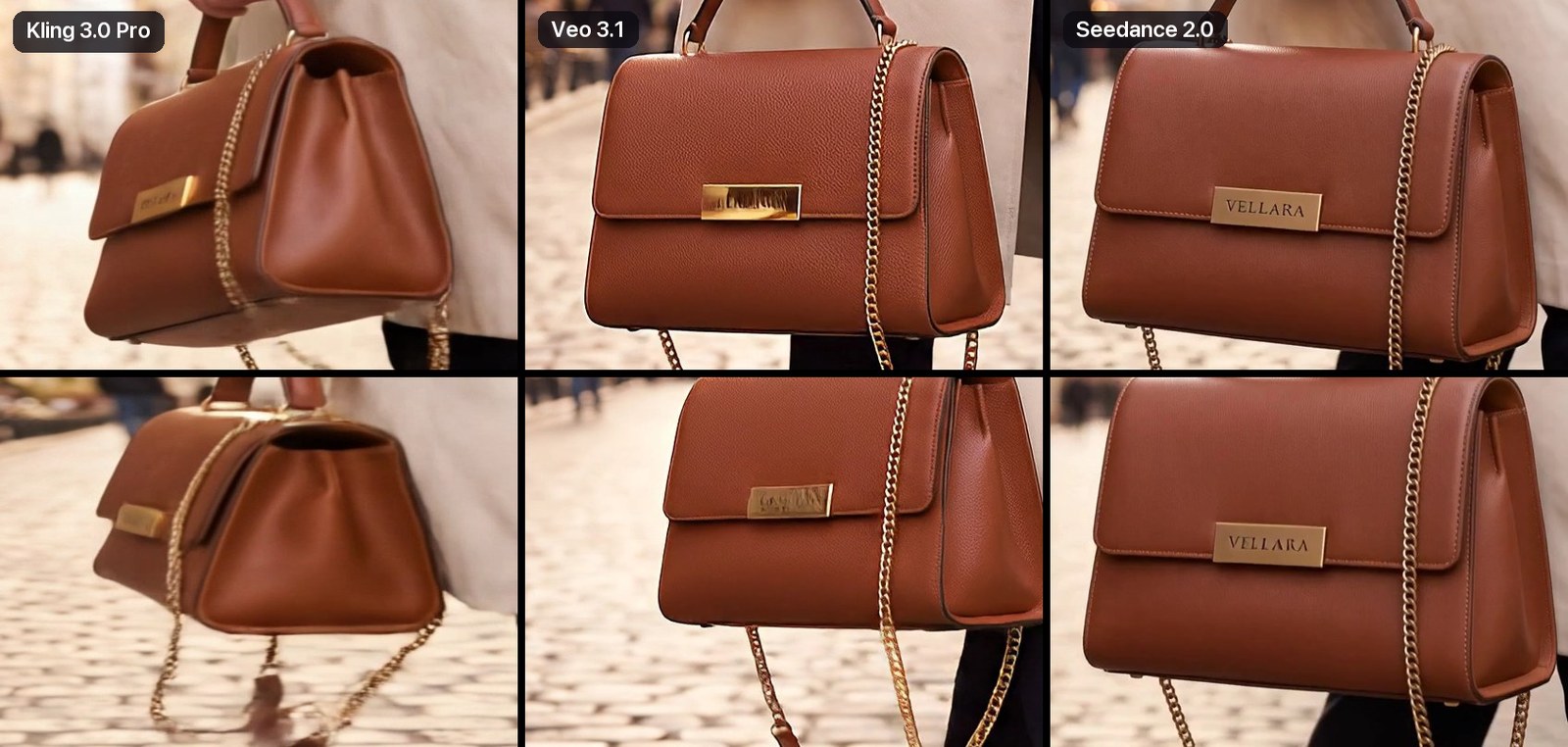
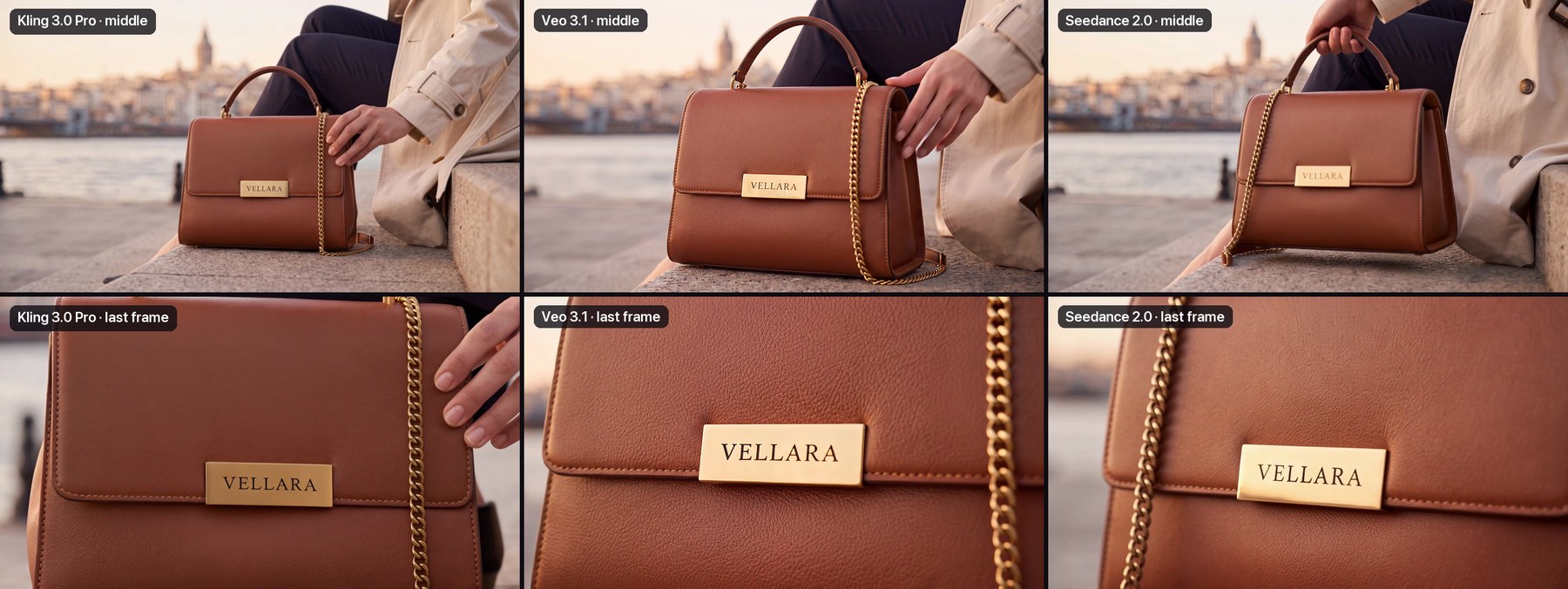
Three findings stand out: Kling best keeps the product's shape through an orbit; Seedance keeps a moving logo the most legible; Veo gives the sharpest texture in close-up but breaks the lettering on a moving plate. With the face out of frame, Seedance refused no frame.
Stitching and 4K
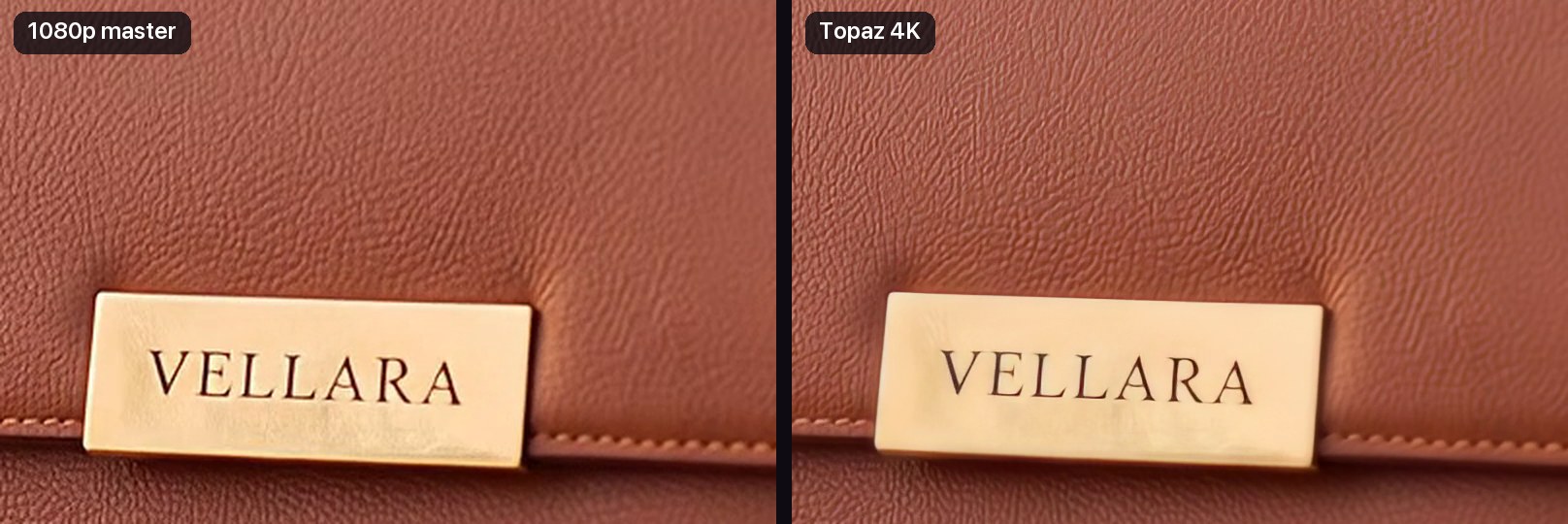
The three chosen clips and the two bridges were joined in a single Stitch box into a 22-second 1080p master, then upscaled to 3840×2160 with Topaz Video AI. The final file is 73 Mbps H.264.
Stitch re-encodes each clip once and does it close to losslessly: x264 slow preset, CRF 16, 24 fps. The film takes the size of the largest clip, so a 720p clip placed before a 1080p one doesn't drag the film down to 720p.
Upscale is applied to the film once, not to the clips one by one. Topaz processes the whole film in a single pass, so grain and sharpness don't change from shot to shot. The 22-second film went to 4K in 2 minutes 17 seconds, for 115 credits. In our first attempt, 16 seconds took 13 minutes; the time depends on the queue at fal.
A bug we found and fixed along the way
Kling 3.0 Pro's High output isn't exactly 1920×1080 but 1928×1072. Veo's is 1920×1080. Stitch picked 1920×1080 by area, shrank the Kling clip to fit and padded it at the top and bottom. The result: 6-pixel black bars on the Kling shots, 12 pixels in 4K. They disappeared when the film cut to the Veo shot.
ffmpeg cropdetect showed it plainly: crop=1920:1068:0:6 on the Kling shots, the full frame on the Veo shot. The fix is live and users don't have to do anything; Visuall AI now lines up clips of different sizes in Stitch by itself: a clip whose aspect ratio is within 2% of the film's frame is scaled up to fill it and loses a few pixels at its edges. Clips of a really different shape, like portrait or 4:3, still fit with bars as before. On the first canvas we re-ran only Stitch; the clips came from the cache, and the only thing paid for again was the 4K upscale.
From a producer's seat: why we don't go to the models directly
The models themselves are the same everywhere; you can call Kling, Veo and Seedance on their own sites too. The difference is in the work between the models. What decides quality in an ad film isn't how good a single clip is, but whether the three clips show the same product and what a revision costs.
- The workflow stays alive. Going back and forth between platforms, comparing and picking outputs, you lose information at every hand-off. On the canvas we don't build a one-off output but a workflow: a living structure you can reuse and improve. Working directly with a model provider, what you're left with is a static file.
- The product is locked once. The hero image and keyframes are made in 4K and the same file goes to all three models. Working directly, you upload to each site separately and each applies its own crop and compression. On the canvas the models animate the same pixels, so the comparison above is genuinely fair.
- The winning model changes with the shot. In the results table no model won all three shots. Someone working directly either ties themselves to a single vendor or juggles three dashboards by hand, each with duration, resolution and sound settings under different names and with different limits. On the canvas the three models sit side by side, wired to the same input, and run in parallel with one click.
- The transition is part of the workflow too. The Last Frame box takes the frame where a shot ends, the End frame input takes the frame where the next one begins, and the model makes the bridge between them. Working directly, that means exporting frames by hand and uploading them to another site. On the canvas the link is made once; even if a shot changes, the bridge is made again from the right frames.
- "1080p" really is 1080p. A model's 1080p version is often a separate endpoint or a separate parameter. High quality routes Kling to the v3/pro endpoint, Veo to 1080p output and Nano Banana Pro to 4K. Then Stitch encodes the film at the largest clip's size with CRF 16, and Upscale takes the film to 4K in one pass. Downloading from three sites and re-encoding in an editor loses a little detail at every step.
- A revision costs only the box that changed. Each box's result is cached by its inputs, its settings and the model's configuration. On the first canvas, fixing the studio frame cost 12 credits. When we added the bridges, the nine clips came from the cache; only the two bridges (44 credits) and the new 4K upscale were paid for. When the client says "let's make the chain shorter", only one text box and the path wired to it change, not the whole film.
- Image and motion live in separate boxes. The keyframe prompt says what the frame looks like; the motion prompt says what the camera does. Changing a shot's motion doesn't touch the approved frame; the frame agreed with the client stays as it is.
- Failure is free and readable. In our first attempt, Seedance's two refusals cost 0 credits and the box stated the reason plainly; once we fixed the frame and ran it again, it made the clip. If one item in a box with several outputs fails, regenerating keeps the ones that worked and retries only the failed one.
- The canvas is the production itself. The film's spec lives there: which frame with which prompt, which model at which quality, which clip went into the film. Tomorrow the same canvas can be run again for another bag by changing only the brief box.
Direct access has its place too: if you're making a single clip with a single model, the provider's own site is enough, the raw price per clip can be lower there, and some model-specific controls haven't reached the Visuall AI canvas yet. But an ad film isn't a single clip. As soon as several shots, several models and revisions come in, the advantages above are what decide it.
Cost and time
The final film cost 454 credits; on the Pro plan (1,300 credits for $39) that's about $14.
| Box | Model and quality | Credits | Time |
|---|---|---|---|
| Hero image | Nano Banana Pro, High (4K) | 19 | 34 s |
| 3 keyframes | Nano Banana 2 Edit, High (4K) | 36 | 44–49 s |
| Shot 1 | Kling 3.0 Pro, 1080p, 5 s | 36 | 1 min 47 s |
| Shot 2 | Seedance 2.0, 1080p, 5 s | 127 | 3 min 5 s |
| Shot 3 | Veo 3.1, 1080p, 6 s | 77 | 2 min 13 s |
| 2 Last Frames | ffmpeg | 0 | a few seconds |
| 2 bridges | Kling 3.0 Pro, 1080p, 3 s each | 44 | about 1.5 min |
| Stitch | 1080p master, 22 s, CRF 16 | 0 | about 3 min |
| Upscale | Topaz, 4K | 115 | 2 min 17 s |
| Final film | 454 | about 12 min |
The other six clips in the comparison: Kling shots 2 and 3 at 36 credits each, Veo shots 1 and 2 at 77 each, Seedance shots 1 and 3 at 127 each. The final film's own path (frames, the three chosen clips, bridges, Stitch and 4K) took about 12 minutes including waits; boxes run at the same time, so the times in the table don't add up.
What isn't good yet
- Lettering isn't fully safe in any model. In this run Veo broke the letters on a moving plate, Kling left the lettering blurred in fast motion, and Seedance changed the plate's colour mid-orbit. Whether a model keeps the lettering right in frames where the logo is small or moving is still down to luck. On a real brand job you may need to fix the last frame with the actual logo plate.
- 4K upscaling is slow. This time 22 seconds took 2 minutes 17 seconds; in the first attempt, 16 seconds took 13 minutes. It makes sense to do it once, at the very end of the film.
- Seedance doesn't accept faces. It rejects frames with a photo-real face. For shots where the face has to show, Kling, Veo or Omni are the better choice.
- The bridges are short and single-minded. Each bridge is 3 seconds and relies on the same camera move: into the logo and out into the next scene. A different transition needs a different bridge prompt.
Results
All files are uncompressed originals and can be downloaded.
| What | Resolution | Link |
|---|---|---|
| 4K film, with bridges | 3840×2160, 22 s, 73 Mbps | visuall.ai/p/jxpz-gTS |
| 1080p master, with bridges | 1920×1080, 22 s | visuall.ai/p/Zma5I158 |
| The two bridge clips | 1080p, 3 s each | visuall.ai/p/2ct-Qq9X |
| Nine clips, 3 shots × 3 models | 1080p | visuall.ai/p/zmVlzdOF |
| Hero and keyframes | 5504×3072 | visuall.ai/p/M6UtjD5F |